


Truth Social
3.09.59K Reviews
App Specs
- Version
- 1.27.4
- Updated On
- License
- Free
- Downloads
- 5,000,000+
- Developer
- T Media Tech LLC
- Categories
- Social
- Platform
- Android, iOS
Screenshots

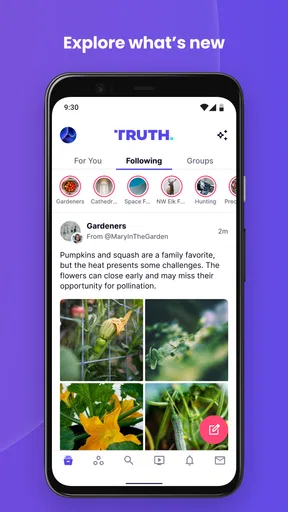
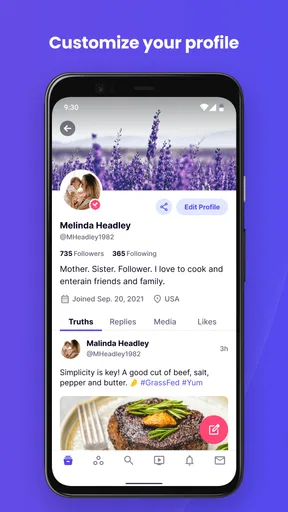
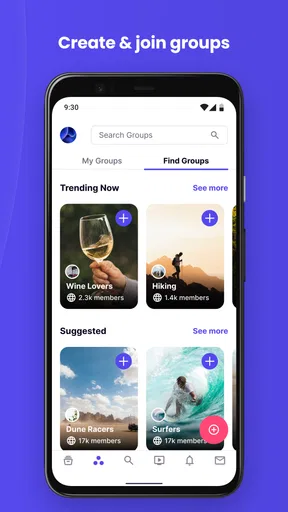
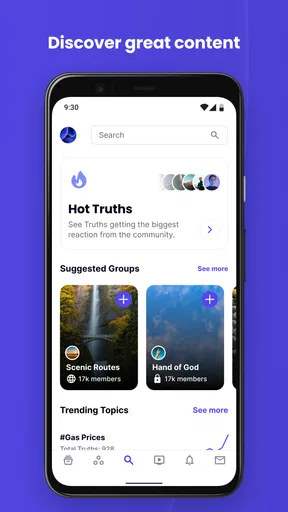



 Analysis by AppCompare
So, I recently got around to checking out Truth Social, the social media platform that’s been making quite the buzz. Whether you’re curious or cautious, I’ve got the lowdown on what it’s all about. Let’s dive in and see if it’s worth your time.
Who is likely to get the most from it?
I’d consider this app if you want a separate place to follow political conversation, public figures, and commentary that may not be central to your usual social feeds. The most useful question to ask before installing it is not whether you agree with every post, but whether the people and subjects you care about are active there. A social network can feel busy while still being a poor fit if the accounts you want to follow are elsewhere.
For a practical trial, I’d start by following a small number of accounts whose posts you genuinely want to keep up with, rather than trying to build a large feed on day one. That makes it easier to judge the signal-to-noise balance. If you find yourself opening the app to check particular voices or discussions, it may have a clear role; if you keep scrolling without finding anything useful, another network may suit you better.
It is also worth separating following from endorsing. Reading or sharing a post does not require you to treat every claim as reliable. I’d use the same caution I bring to any fast-moving social feed: check who posted, look for context, and seek independent reporting when a claim matters. The platform’s emphasis on open expression is not a substitute for evaluating what appears in front of you.
Using the feed with a little more intention
A realistic everyday use might be checking the feed over breakfast, saving your attention for posts from accounts you deliberately follow, then returning later to see whether a discussion has developed. Notifications can help with that, but I would keep them focused on the activity I care about instead of letting every response interrupt the day. A social app becomes easier to live with when it has a defined job rather than an open invitation to check it constantly.
There is a useful trade-off between a tightly chosen feed and searching broadly. Following a focused set of voices can make the home feed easier to scan, while search can expose you to conversations outside that circle. I’d use search with a question in mind—such as finding current discussion around a topic—then return to the feed instead of treating every trending result as a recommendation. That small habit helps distinguish purposeful browsing from an endless scroll.
Sharing deserves a pause, especially when a post is emotionally charged. Before using Re-Truth, I’d read beyond the first line and check whether the original post gives enough context to make sense on its own. Re-sharing can bring a useful point to your followers, but it can also pass along a claim faster than you can assess it. That is a more meaningful choice here than simply tapping a reaction.
Worth Reading Before You Choose

EA SPORTS FC Mobile 26 Is a Bigger Football Game, but It Takes Time

Flipboard Shows What News Apps Must Do Beyond the Feed

Switching to Android Auto Means Rethinking Your Driving Routine

Google Calendar Makes a Crowded Week Easier to Manage

Ludo King Makes the Most of the Minutes Between Plans

Baby Panda World Brings Quick Play to Modern Phones, but Its Game Library Feels Busy
How it fits beside other social networks
Compared with broad, established social apps, Truth Social is best approached as an additional channel rather than an automatic replacement. If your friends, work contacts, or local groups are concentrated elsewhere, moving your whole social routine may leave you with less of the practical conversation you need. Its appeal is more specific: a different gathering place for public discussion and accounts you may not encounter in the same way on your main network.
That distinction matters if you are deciding whether to install it for news. A social feed can show you what people are discussing, but it is not the same as a newsroom or a carefully organized reference source. I’d use it to discover viewpoints and follow reactions, then confirm important details through sources with clear reporting practices. If your main goal is a quiet, chronological update stream from friends, a network built around that existing circle may be more satisfying.
Truth Social is free to download, and it is published by T Media Tech LLC. Its social focus is clear, but the fit depends heavily on whether its community and conversation style match what you want from an extra platform. The app has a 3.0 average rating from around 27,000 ratings, which is a reminder that people’s experiences are mixed rather than a guarantee of what you will encounter on your own device.
Getting Started with Truth Social
Setting up an account on Truth Social was pretty straightforward. You download the app, sign up with your email, and create a username. The interface is clean and modern, which is always a good first impression. It feels somewhat similar to other social media platforms, so if you’ve used any big names, you’ll find this transition pretty smooth.
Once inside, you’re greeted with a familiar layout. You’ve got your feed, where you see posts from people you follow, and a search feature to explore trending topics. It’s simple and to the point, which I appreciate.
Features That Stand Out
Alright, let’s talk features. One thing that caught my eye was the emphasis on free speech. The app promotes itself as a place where users can freely express their opinions, which might be appealing if you’re feeling restricted on other platforms. But, of course, with great freedom comes great responsibility, and moderation is a hot topic here.
The app also has a neat feature called "Truths," which is essentially their version of tweets. You can like, share, and comment on these Truths, and there’s even an option to "Re-Truth" if you want to share something with your followers.
Another feature worth mentioning is the notification system. It’s customizable, so you can tweak it to notify you about things that matter most, which is handy if you want to avoid the constant pinging from every reaction or comment.
Community Vibes
The community on Truth Social is diverse, with a mix of viewpoints. This can be both a blessing and a challenge. If you’re looking to engage in discussions across a spectrum of topics, you’ll find plenty of opportunities here. However, it's important to navigate conversations carefully, as things can get heated.
One thing to note is the verification process. Verified accounts get a little badge, adding a layer of credibility. If you’re someone who likes to follow key figures or influencers, this feature helps distinguish between genuine accounts and potential imposters.
Readability, movement, and everyday access
For me, the familiar feed-and-search arrangement keeps the basic tasks easy to recognize: check posts, look up a topic, and move between the main areas. That familiarity can reduce the learning curve, particularly if you already use other social apps. Still, a clean-looking screen does not automatically make a long feed comfortable to read. Dense text, rapid topic changes, and heated replies can all demand sustained attention, so I’d browse in short sessions if I were finding the screen tiring.
On a phone, reading and interacting are usually done through touch, which can be awkward for anyone who has difficulty with precise taps or repeated hand movements. I would avoid rushing through reactions and comments; pausing to open the post you mean to respond to is safer than tapping quickly while scrolling. If text is hard to read, the phone’s own display and text-size settings may help, though the effect can vary by device and by how the app lays out its screens.
Sound and visual alerts are another personal comfort issue. Since notifications can be adjusted, I’d choose only the activity that genuinely needs a prompt, then rely on checking the app when convenient for everything else. That can make the experience less disruptive in a shared room, during work, or when a stream of alerts is stressful. People sensitive to fast-changing content may also prefer to enter with a specific account or topic in mind instead of browsing without a stopping point.
When the app is not the right fit
I would skip it if you mainly want a private-feeling space for close friends, a carefully curated news product, or a feed that avoids contentious public debate. The app’s social nature means that posts and replies can bring disagreement directly into view. If that kind of conversation regularly leaves you drained, there is no need to treat participation as an obligation; a quieter group chat or a news reader may serve the same practical need with less social friction.
It may also be a poor choice if you need every important discussion to happen in one place. Your contacts may be spread across several services, and installing another platform does not automatically bring those relationships with it. I’d treat it as optional and decide after a short, purposeful trial whether it adds something distinct. On an older or less responsive phone, any social feed can feel more effortful than reading a website or a text-based update, so device comfort matters as much as the app’s layout.
Design and Usability
I must say, the design is visually appealing and user-friendly. The navigation bar at the bottom makes it easy to switch between sections like Home, Search, Notifications, and Profile. It’s all pretty intuitive, so even if you’re not tech-savvy, you’ll get the hang of it quickly.
The app runs smoothly for the most part, though I did experience a few minor glitches. It’s nothing a quick update can’t fix, but worth mentioning if you’re someone who gets frustrated with tech hiccups.
The current version is 1.26.1, and it requires Android 8.0 or later. It is rated Teen, so I would not assume that every discussion will feel suitable for younger readers simply because the app is available to them. I’d make the choice with the actual user in mind, especially if they are likely to encounter contentious posts or replies.
Final Thoughts
So, is Truth Social the next big thing? It depends on what you’re looking for. If you value open discussions and a platform that encourages a plethora of ideas, it might just be your cup of tea. However, like any social platform, it’s a double-edged sword—freedom of speech can mean encountering content you might not always agree with.
Overall, it’s a solid option if you’re looking for something different and are open to exploring varied viewpoints. It’s not perfect, but then again, no platform is. If you’re curious, give it a shot. You might just find it’s the refreshing change you’ve been looking for.
My inclusive verdict is practical rather than sweeping: the recognizable navigation and adjustable notifications offer a couple of ways to make the experience more manageable, but that does not guarantee it will work equally well for every ability or situation. I’d try it in the way I expect to use it, paying attention to reading comfort, touch accuracy, interruptions, and whether the conversations feel worthwhile. If those demands outweigh the value of the community for you, choosing a different way to follow public discussion is a perfectly reasonable decision.
Pros
- User-friendly interface and navigation.
- Focus on free speech and diverse opinions.
- Customizable profile settings.
- Real-time updates and notifications.
- Growing user community and engagement.
Cons
- Limited to iOS devices currently.
- Content moderation is inconsistent.
- Lacks some advanced social features.
- Occasional app stability issues.
- Small user base compared to competitors.
FAQs for Truth Social
What is Truth Social and who is it for?
Truth Social is a social media platform developed to promote open, honest, and free dialogue. It is designed for users who are looking for an alternative to mainstream social media networks, and it caters to individuals who value free speech and diverse opinions. Ideal for those who enjoy engaging in discussions about current events, politics, and more.
How do I create an account on Truth Social?
To create an account on Truth Social, download the app from the App Store or Google Play. Once installed, open the app and follow the on-screen instructions to sign up. You will need to provide basic information such as an email address and a password. After verifying your email, you can set up your profile and start using the platform.
What features does Truth Social offer?
Truth Social offers various features typical of social media platforms, such as posting updates, sharing content, following other users, and engaging in discussions. It also emphasizes user privacy and free speech, allowing users to express their views without fear of censorship. Additional features include trending topics and customizable profiles.
Is Truth Social available in my country?
Truth Social is primarily available in the United States, but it is expanding its reach to other countries. Availability can vary, so it's best to check the app store on your device or the Truth Social website for the most current information about international access. Future updates may include broader geographic availability.
Is Truth Social free to use?
Yes, Truth Social is free to download and use. Users can access all basic features without any cost. However, like many social media platforms, it may offer optional in-app purchases or premium features in the future. Always check for any updates related to their pricing model to stay informed.


